
Data Translator
XCL ‘converts’ or ‘translates’ events and user interactions from media or content into meaningful data.
How does it work?
That’s a patent-pending secret, but we can tell you what to expect.
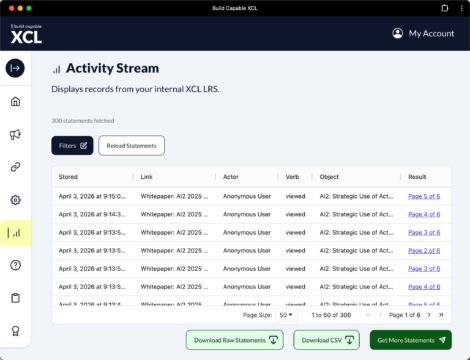
Since XCL allows you to track far more than just eLearning content, our Data Translator captures data from activities that are not normally tracked in a training program.
The translation allows you to normalize the interactions from these events into the ‘language’ of training (xAPI) to avoid complex reporting and data visualization issues.
creen reader users: Web links found on this page are presenting data in a visual format and are not active links.
Content Translation Tables
Screen reader users: Web links found on this page are presenting data in a visual format and are not active links.
XCL supports the following content formats: xAPI, cmi5, SCORM (2004 1-4 ed. and1.2), video (mp4), downloads (pptx, doc, xlsx), images (png and jpg), and pdf. The following content translation tables include the data XCL will produce for each type of content.
xAPI
xAPI-published content will track as programmed. The xAPI statements used in the content are sent as-is without translation. We simply capture the individual’s identifying data (or create an anonymous identifier) and make the connection to the LRS. Yay!
cmi5
The following table outlines how XCL will handle the verbs used by cmi5. Keep in mind that XCL does not track session-based interactions like a learning management system (LMS). XCL only tracks real interactions by a person with the content. XCL will record custom xAPI statements in cmi5 content, too! They will be presented in the LRS as they are received.
| xAPI Verbs used in cmi5 | Notes |
|---|---|
| launched | Sent by XCL immediately before the module is launched to indicate that the learner has initiated a session. This is the first cmi5-specific statement in a launch sequence. |
| initialized | Sent by the module after it has successfully started and established communication with the LRS. Indicates that the learning session has begun successfully. |
| terminated | Sent by the module when the learner exits the activity normally. Marks the end of the learning session and should be the final statement sent by the module in a session. |
| completed | Indicates that the learner has completed the learning activity. Completion is independent of success or assessment results. |
| passed | Indicates that the learner achieved the required success criteria or mastery score for the activity. Typically accompanies or follows a completed statement. |
| failed | Indicates that the learner did not achieve the required success criteria or mastery score. Completion may still be recorded even if the learner fails. |
| abandoned | In an LMS environment, this data may be sent when a session ends unexpectedly, such as when the learner closes the browser or loses connectivity before a terminated statement can be sent. XCL does not track interactions by session, nor assume that a user has abandoned the content, and will not send this statement. |
| waived | An LMS sends this data to indicate that the learner was excused from completing the activity. No launch or interaction is required for the activity to be considered waived in an LMS. XCL does not generate this statement because it is not used in a non-LMS environment. |
| satisfied | Indicates that the learner has met the defined moveOn requirements for the activity or course structure. This verb is typically generated by an LMS after evaluating completion and success conditions. However, XCL does not generate this statement because it is not necessary in a non-LMS environment. |
| custom verbs | Custom xAPI statements in cmi5-published content are presented in the LRS as they are received. |
SCORM
XCL provides support for published SCORM 2004 and SCORM 1.2 modules. Each module will behave as though it is running in a SCORM-conformant LMS. The state of this pseudo-LMS is preserved for the module within the browser. When a new browser is used or if the cache of the browser is cleared, the state will be reset.
All SCORM data is recorded with the ADL’s “course” activity type: http://adlnet.gov/expapi/activities/course
| SCORM 2004 Data | xAPI Verb | Notes |
|---|---|---|
| cmi.location | experienced | Location is stored as result/extension http://buildxcl.com/xclscorm/lessonlocation |
| LMS command: Initialize | attempted | |
| The following are progress related. For cmi.completion_status and cmi.success_status | These all include result data for: completion, success, score/scaled, and duration. | |
| cmi.success_status: passed | passed | |
| cmi.success_status: failed | failed | |
| cmi.success_status: unknown | progressed | This is unlikely but sometimes this is called when a module is opened. |
| cmi.completion_status: completed | completed | |
| cmi.completion_status: incomplete | progressed | Result data can be used to determine completion and success. |
| cmi.completion_status: not attempted | progressed | This is unlikely but sometimes this is called when a module is opened. |
| cmi.completion_status: unknown | progressed | This is unlikely but sometimes this is called when a module is opened. |
| LMS Command: Exit (terminated) | exited | Includes all result data. |
| SCORM 1.2 Data | xAPI Verb | Notes |
|---|---|---|
| cmi.core.lesson_location | experienced | Location is stored as result/extension http://buildxcl.com/xclscorm/lessonlocation |
| LMS command: LMSInitialize | attempted | |
| The following are progress related. For cmi.core.lesson_status | These all include result data for: completion, success, score/scaled, and duration. | |
| cmi.core.lesson_status: passed | passed | Failed, Passed, and Completed are all measured in the same cmi element and may not be separate statements. If something is Passed or Failed it is assumed that it is also completed |
| cmi.core.lesson_status: failed | failed | Failed, Passed, and Completed are all measured in the same cmi element and may not be separate statements. If something is Passed or Failed it is assumed that it is also completed |
| cmi.core.lesson_status: completed | completed | Failed, Passed, and Completed are all measured in the same cmi element and may not be separate statements. If something is Passed or Failed it is assumed that it is also completed |
| cmi.core.lesson_status: incomplete | progressed | Result data can be used to determine completion and success. |
| cmi.core.lesson_status: not attempted | progressed | This is unlikely but sometimes this is called when a module is opened. |
| LMS Command: LMSFinish (terminated) | exited | Includes all result data. |
Video
Videos will play in the browser from their location. No streaming service is used. XCL limits the type of videos to MP4 and MPEG to ensure high-efficiency and take advantage of built-in buffering behavior associated with this format in the browser.
XCL listens for events that occur in the video player and converts those to xAPI statements.
All video data is recorded with the ADL’s “media” activity type: http://adlnet.gov/expapi/activities/media
| Video Event | xAPI Verb | Notes |
|---|---|---|
| launched | launched | When the video player is initialized. Includes result extension: http://buildxcl.com/xclvideo/videoduration |
| opened | started | When the video is loaded and playable. Includes result extensions: http://buildxcl.com/xclvideo/currentlocation and http://buildxcl.com/xclvideo/videoduration |
| played | played | The user clicks play or anytime the video resumes playing (for example, after seeking or after pause). Includes result extensions: http://buildxcl.com/xclvideo/currentlocation and http://buildxcl.com/xclvideo/videoduration |
| ratechanged | ratechanged | Anytime the user changes the rate of the playback. Includes result extensions: http://buildxcl.com/xclvideo/currentlocation and http://buildxcl.com/xclvideo/videoduration and http://buildxcl.com/xclvideo/playbackrate |
| paused | paused | Includes result extensions: http://buildxcl.com/xclvideo/currentlocation and http://buildxcl.com/xclvideo/videoduration |
| seeked | skipped | Anytime the position in the video is changed by the user. Includes result extensions: http://buildxcl.com/xclvideo/currentlocation and http://buildxcl.com/xclvideo/videoduration |
| ended | completed | When the video has reached the end of its duration. Includes result extensions: http://buildxcl.com/xclvideo/currentlocation and http://buildxcl.com/xclvideo/videoduration |
| exited | exited | When the user has used the back button to return to the form ending the video session. Includes result: duration |
Downloads
Downloads are started once the user completes the form and clicks the ‘continue’ button. Downloads can be PPT, PPTX, DOC, DOCX, XLS, or XLSX file types.
All download data is recorded with the ADL’s “file” activity type: http://adlnet.gov/expapi/activities/file
| Event | xAPI Verb | Notes |
|---|---|---|
| File download requested | launched | Called when the download starts (when the form’s ‘continue’ button is clicked). |
Weblink
All weblinks open in the same tab once the user completes the form and clicks the ‘continue’ button (most websites will prevent opening in an iframe).
All weblink data is recorded with the ADL’s “link” activity type: http://adlnet.gov/expapi/activities/link
| Event | xAPI Verb | Notes |
|---|---|---|
| opened | launched | Called when the form’s ‘continue’ button is clicked. |
Image
Images open in the same tab as the XCL landing page. The image is displayed after the user clicks the ‘continue’ button on the form.
All image data is recorded with the ADL’s “media” activity type: http://adlnet.gov/expapi/activities/media
| Event | xAPI Verb | Notes |
|---|---|---|
| viewed | launched | Called when the image is viewed. |
| zoomed | zoomed | Called when the image is clicked on and a zoom action is executed. |
| exited | exited | When the user has used the back button to return to the form ending the image session. Includes result: duration |
PDF documents open in the same tab as the XCL landing page. The PDF is displayed after the user clicks the ‘continue’ button on the form.
All PDF data is recorded with the ADL’s “media” activity type: http://adlnet.gov/expapi/activities/media
| Event | xAPI Verb | Notes |
|---|---|---|
| opened | launched | Called when the PDF loads in the PDF viewer. |
| viewed | viewed | Called each time the readable page changes. Page number is also captured. |
| printed | printed | Called when the print command is activated. This feature will not know if the document was successfully printed or not. |
| downloaded* | downloaded* | *Optional for E-XCL accounts only. Called when the PDF is downloaded. |
| exited | completed | When the last page is viewed. Includes result: duration |
Interested in customizing your XCL Translator?
Build your E-XCL subscription today!